
Are you fed up with the stupid WYSIWYDon’tG visual editor in WordPress and Blogger?
Trying to just line the f*cking image to the right and have text lined up with its top?
Suffering from drifting image woes?
Welcome to my world. For years, I’ve spent hours wending my way through HTML 3.0 and 4.0, and CSS 1.0 and 2.0. Now I’m paying it forward.
“HTML For Dummies” is a series about working with raw HTML, aimed at people who don’t know very much about it. In fact, this series will work best within the context of a blog, because blogs take care of many things already for you, the least of which is sidebars and basic styling.
Each week we’ll look at a couple very basic tips and a few recipes based on a theme.
This week: why visual editors suck; accessing the HTML editor in WordPress, Blogger, and LiveJournal; and three recipes for aligning simple images with text.
Contents
Basic Tips
Tip the 1st: Visual editors suck.
Tip the 2nd: Getting to the HTML editor.
Recipes
Tip the 1st: Visual editors suck.
Visual editors, aka WYSIWY(supposedly)G, have limitations. They can’t do all the fancy formatting that HTML, combined with stylesheets, lets you do, which is a lot (take a gander at the sites featured on Stylegala or the stylesheet magic at CSS Zen Garden).
Some editors are better than others at presenting you with features; a rare few are even easy to understand. But for many blogging platforms, focus for development tends to be everywhere else—except the editor.
This is because the software writers know you can, if you really want to, resort to raw HTML, which almost all blogging platforms support.
So if you want to have more than one image stacked up nicely, do something decent with headers, or be able to present your readers with a clickable Table of Contents, you need to hit the code, baby.
Tip the 2nd: Getting to the HTML editor.
Usually it’s another tab called “Code” or “Edit HTML”, which you can click on to get to the raw HTML editor. Here are some screenshots on page 2 for WordPress, Blogger, and LiveJournal.
Recipes: Image Aligning
Placing images can be a bit… frustrating. I do this kind of thing in just about every post these days, although I have an additional wrinkle with respect to captions. If you need captions as well, that’s for another day and another post.
Here is are some examples and code for you to copy/paste and modify.
Image to the left, no caption, text lined at top.
Example:
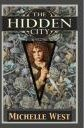 The Hidden City: The House Wars: Book One
by Michelle West
From Amazon.com:
Orphaned and left to fend for herself in the slums of Averalaan, Jewel Markess—Jay to her friends—meets an unlikely savior in Rath, a man who prowls the ruins of the undercity. Nursing Jay back to health is an unusual act for a man who renounced his own family long ago, and the situation becomes stranger still when Jay begins to form a den of other rescued children in Rath’s home. But worse perils lurk beneath the slums: the demons that once nearly destroyed the Essalieyan Empire are stirring again, and soon Rath and Jay will find themselves targets of these unstoppable beings.
The Code—which assumes that automatic line breaking is on, so you don’t have to keep hitting
, but also means that you can’t just hit enter in any old place:
 The Hidden City: The House Wars: Book One
by Michelle West

From Amazon.com:

Orphaned and left to fend for herself in the slums of Averalaan, ...
Note that the
Switching to the right is very easy, as we see in the next section….
Image to the right, no caption, text lined at top.
Example:
The Hidden City: The House Wars: Book Oneby Michelle West
From Amazon.com:
Orphaned and left to fend for herself in the slums of Averalaan, Jewel Markess—Jay to her friends—meets an unlikely savior in Rath, a man who prowls the ruins of the undercity. Nursing Jay back to health is an unusual act for a man who renounced his own family long ago, and the situation becomes stranger still when Jay begins to form a den of other rescued children in Rath’s home. But worse perils lurk beneath the slums: the demons that once nearly destroyed the Essalieyan Empire are stirring again, and soon Rath and Jay will find themselves targets of these unstoppable beings.
Here’s the code—again, assuming automatic line-breaking is on:
 The Hidden City: The House Wars: Book One
by Michelle West

From Amazon.com:

Orphaned and left to fend for herself in the slums of Averalaan, ...
Note that we didn’t change where the float value in the style attribute to be right instead of left, and changed where the 10px margin is (on the left this time).
Variant on image to the right, no caption, text lined at top.
Here’s a small variant. Suppose you want the book image to be in the paragraph text, rather than lined up with the title, so that it basically appears somewhere below the title, the byline, and the From Amazon.com:
by Michelle West
From Amazon.com:
Orphaned and left to fend for herself in the slums of Averalaan, Jewel Markess—Jay to her friends—meets an unlikely savior in Rath, a man who prowls the ruins of the undercity. Nursing Jay back to health is an unusual act for a man who renounced his own family long ago, and the situation becomes stranger still when Jay begins to form a den of other rescued children in Rath’s home. But worse perils lurk beneath the slums: the demons that once nearly destroyed the Essalieyan Empire are stirring again, and soon Rath and Jay will find themselves targets of these unstoppable beings.
Here’s the code, blah blah assuming automatic line-breaking is on blah:
The Hidden City: The House Wars: Book One
by Michelle West

From Amazon.com:

 Orphaned and left to fend for herself in the slums of Averalaan, ...
We just moved the
Important note: If you have automatic line-breaking on, don’t put a line break between the end of the
The Floor is Open
If you have any questions, please feel free to ask!
Requests for future articles in this series are quite welcome, though obviously I reserve the right to pick and choose. :)
If you don’t wish to comment, you may also email me or use the contact form.
Thanks for reading!
Note to those who want to go to the next page: all it has are screenshots of various blog platform editors.
 Spontaneous ∂erivation
I love this article! Thanks so much for explaining how to do this. I tend to struggle with images although I know HTML, I’ve not use float very often, so this was an excellent introduction to some of it’s very useful properties!
ê¿ê
Handy stuff. I tend to just use ‘align=right’ tucked in my image tag since that was how I learnt to do it way back when (HTML 2.0, maybe?) but I’m going to shift to use the style to do it, probably by adding a new style to my css. Cheers.
Thank you SOOOOO much for this!
I’m glad you all found this useful. :)
I should have seen your site earlier. Thanks a lot!
Now I’m thinking if I should change my Blogger template.
You’re welcome, Lubel. :)
Changing Blogger templates can be a headache, especially if you use a template that’s not meted out officially by Blogger. Information about what widgets you have is stored in the template text itself, so replacing a template tends to mean needing to manually replace the widgets.
There are ways around that, but they tend to be ugly.