
Here’s what I track in Mint. Many pictures, all galleried up.
My feed-subscriber folks and LJ readers: you’l likely want to visit this post directly so you can take advantage of the LightBox javascript, which makes looking at the pictures much easier and faster.
Gallery under the cut.
 Mint Dashboard – Normal Browser
Mint is usually 2 columns in a normal browser screen. Even if you click on this, it’s still not the full size; you’d need to click here.
 Mint Dashboard – Widescreen Browser
Mint goes to 3 columns in a decent widescreen resolution. It is glorious. Here’s the full size version.
 Visits Overview
Now we start getting into the individual elements (“panes”) of the Mint dashboard. You’ll notice each pane has different tabs across the top. Currently we’re looking at the Visits pane’s Overview tab. As you can see, I pay attention mostly to the left column and the top right column.
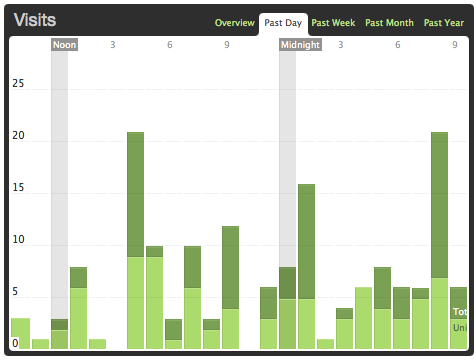 Visits – Past Day
Here’s a stacked bar graph of the visits in the past 24 hours. The light green is unique visits; the dark green is total visits. As you can see, thanks to more series and related posts on my blog, my bounce rate has gone way down.
 Visits – Past Month
You can see similar bar graphs for the past week (last 7 days), past month (last 5 weeks), past year (last 12 months). This pattern of dark/light green and past day/week/month/year is a standard pattern across other Mint panes that can show bar graphs. ((Notes: the bump is a Stumble for my article Thoughts on the 2008 Hugo Nominees for Best Novel: The Last Colony. The last couple weeks are either the general Internets dip for the Olympics, or else my switch in blog topic is really taking a hit on my former audience (not surprisingly so).))
 Visits – Past Year
Healthy blogs tend to go up in visits per month until they reach some kind of plateau. ((The big bump there is a serious Stumble for HTML for Dummies Part 3.)) A blog that switches topics? Not so healthy, but hopefully it’ll become healthy later on. Uh, right. Less blog navel-gazing, more pics. Moving on!…
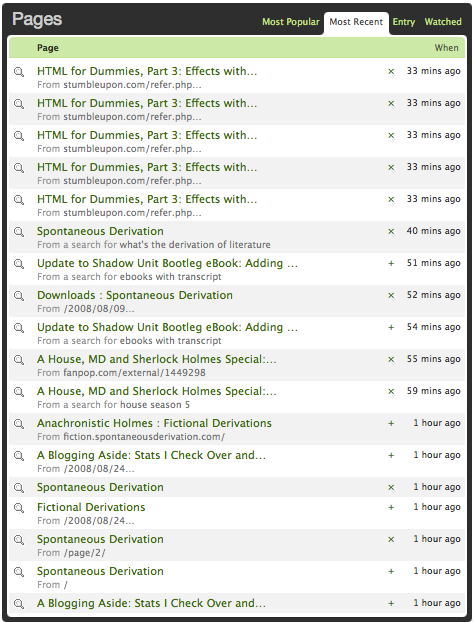 Pages – Most Recent
Here’s one of the tabs for the Pages pane. I can watch, live, people accessing various pages of my site, the referrer (if one could be determined), and the amount of time that’s passed since that page visit. The little “x” and “+” let me choose whether to “watch” specific pages (see the “watch” tab over on the right). I’ll cover what the little magnifying glass means later.
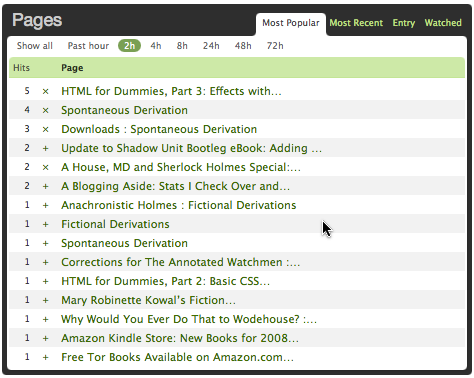 Pages – Popular – Last 2 Hours
Here’s another common pattern across Mint panes: the time-based tabular view, where you can show statistics for the past hour, last 2 hours, last 4 hours, last 8 hours…
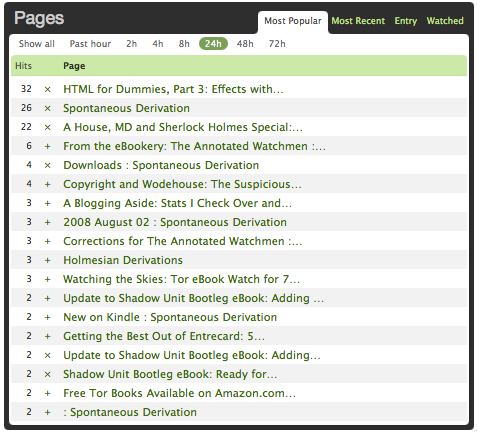 Pages – Popular – Last 24 Hours
… the last 24 hours, 48 hours, 72 hours…
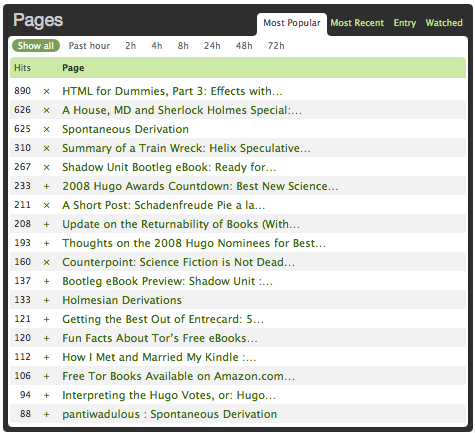 Pages – Popular – All
And finally, popularity across all data in your Mint database, which goes back by default to only 7 weeks ago. Thus you cannot see the glorious 30k hits for the 3rd article in the HTML for Dummies series.
 Pages – Watched
For pages you want to put under the spotlight, you can track hits from each referrer by expanding the little black arrow (the little black expanding arrow is another common Mint pattern to allow you to see an overview with options for zooming in on particular rows). ((And yes, Shadow Unit Bootleg eBook: Ready for Download really does have that many different referrers. LJ can do that, due to how “Friends” pages work.))
 Referrers – Newest Unique
Speaking of referrers, here’s the Referrers pane, set on “Newest Unique”, which shows you different referrers, rather than repeated referrers. Uniqueness is over some extended period of time that I’m not sure off. And yes, you can get an RSS feed of this metric view.
 Referrers – Most Recent
You can see which referrers are search engines here. Newest Unique can screen out search engines; Most Recent does not, but then again, it’s not as necessary for this metric view. Special magnifying glass will be covered in a bit, I promise.
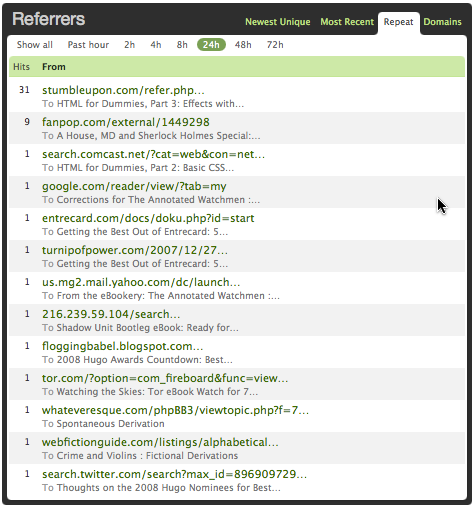 Referrers – Repeat
Which referrers keep giving you love over the last (hour/2h/4h/8h/24h/etc)? StumbleUpon, as you can see, is usually the one who wins out if you’re ever Stumbled—the hits keep trickling in as people re-discover your page when they Stumble across it. This works best if your page is something relatively timeless and also a resource, like HTML/CSS tutorials.
 Referrers – Domains
Tracking your referrers by domain can be fun sometimes. “Sources” tells you how many different pages on that site your visitors came from, and the little black arrow lets you see the specific referrer pages; “Hits” on the right are, well…. You can see where StumbleUpon can be useful.
 Crushes – Most Recent
This is the holy grail of web metrics and statistics: session tracking (here, by IP address). This is not something that comes with the default Mint install; it’s a third-party plugin (“pepper”) that you add, called Secret Crush. I can watch who visits and, by expanding the little black arrow, see what pages they’re looking at, and an estimate of the time they spend per page ((“Time spent per page” is unreliable most of the time, actually, but not all of the time, if you know how to read it correctly so that you can screen out people who are opening multiple pages in separate tabs—those numbers result in a “time per page” of less than 5s.)).
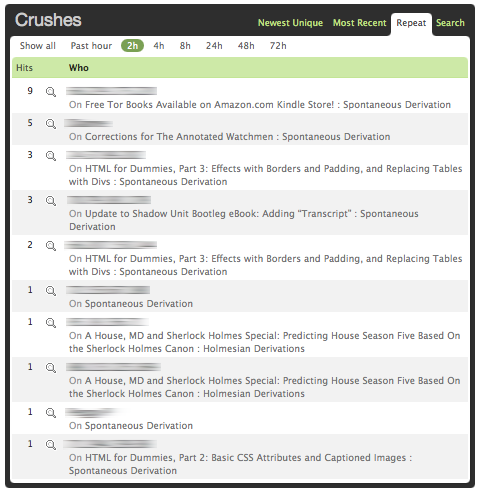 Crushes – Repeat
Who keeps coming back over the last X hours, and what page did they first hit (their entry page)? I’ll note that Secret Crush can be foiled by shared IP addresses. ((Yes, IPs have been blurred out to protect privacy.)) Secret Crush can also look at cookies from a WP install on your domain to get the names of people who comment on your blog and associate them with their IP addresses.
 Crushes – Search
This is the most useful feature in the area of session tracking, and is the explanation for all those magnifying glasses in the other panes; this searches the Mint database for all sessions from that IP address from the last 7 weeks or so. Magnifying glasses in other panes tie back an individual action to an IP and thus to a session. ((For me, this pane is the most useful for watching how people navigate the site, and what they find most useful/interesting, and what site page they visit next. Kicking out content bottlenecks is a good thing for everyone involved.))
Stay tuned for Part 2, which covers outbound links, searches (how’s your S.E.O.?), trending (which is most interesting), Feedburner (and its relative unreliability…), and user agent (and also why IE has bloated statistics across the web).
 Spontaneous ∂erivation


That is a lot of information to sort through. That add-on rocks!